
MagicBullet v3.0.0
This patch addresses various accessibility issues across all Career Sites. This is a temporary solution until these issues can be resolved by the product team. If there are any questions or concerns with the script, please reach out to Michael Spellacy
Installation Anchor ()
Before installing MagicBullet, please verify that it is not already running. If it is not, add the following script:
<script id="radancy-magicbullet" src="https://clientfiles.tmpwebeng.com/shared-libraries/magicbullet/rolling/load.js" type="module"></script>Where To Install
- For older GST career sites that may not have MagicBullet, add it under Settings > General > Footer.
- On Legacy career sites that may not have MagicBullet, add it under Settings > General > Pixel Tracking.
Never install MagicBullet at the theme level, as doing so can cause script conflicts and complicate future maintenance.
Verification Anchor ()
There are two ways to verify that this script is running:
- Check your browsers DevTools console for the following:

- If you've installed A11y Pulse, running it will also indicate whether the patch is active.
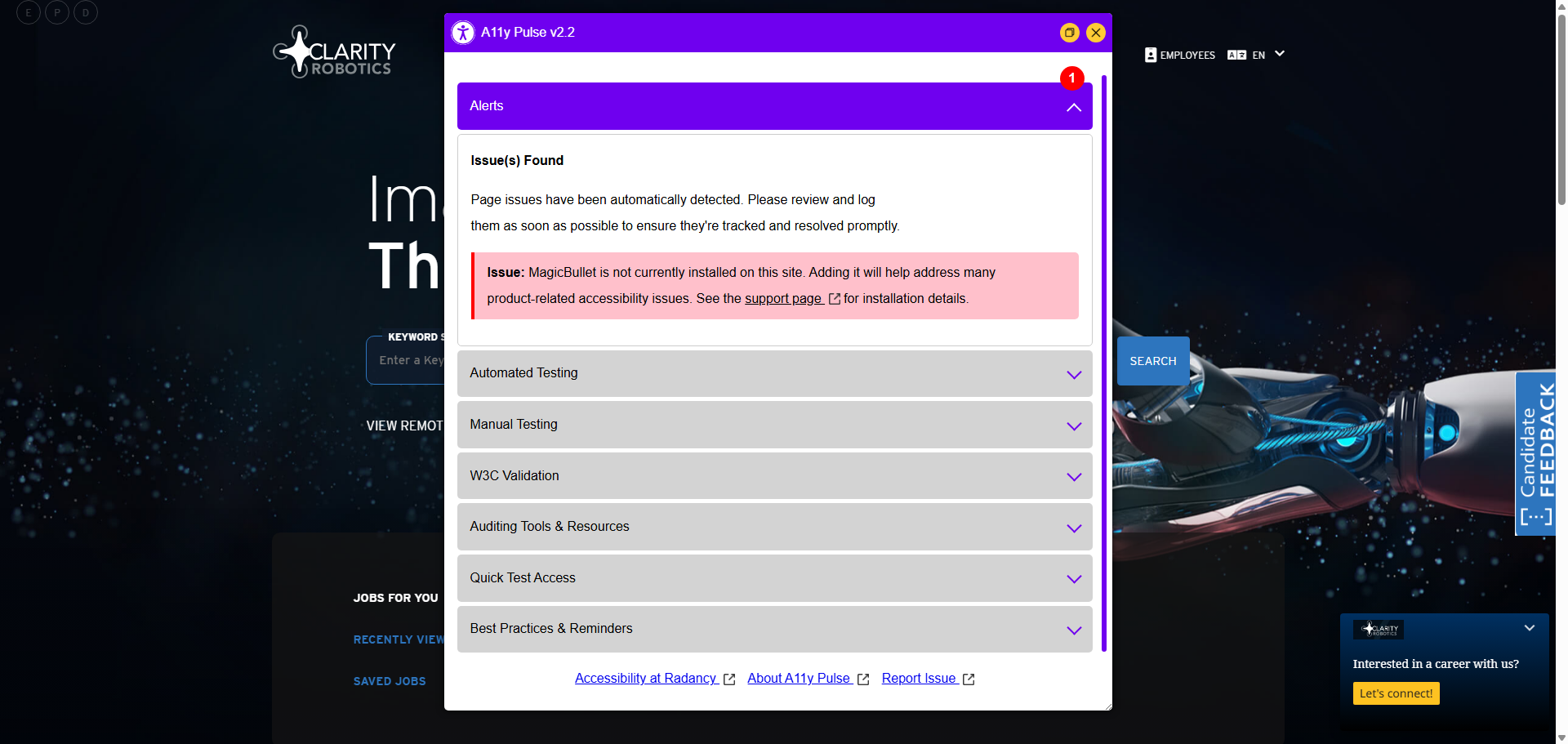
If these messages are missing or you are receiving an alert in A11y Pulse, the patch isn't loading and you'll need to troubleshoot.
Troubleshooting Anchor ()
- Ensure only one instance of MagicBullet loads per page. Multiple MagicBullet scripts can prevent associated features, like the Accessibility Patch, from running.
- MagicBullet can also be initiated via JavaScript to support conditional loading (usually of data attributes). If a conflict occurs, check whether the script is created dynamically. If it exists in your JavaScript, you may be able to remove it and copy the attributes over to the inline version or add the
data-a11yattribute here instead. It may look like this:var magicBullet = document.createElement("script"); magicBullet.setAttribute("id", "radancy-magicbullet"); magicBullet.setAttribute("data-gdpr", "false"); magicBullet.setAttribute("data-gdpr-client-name", "Acme Inc."); magicBullet.setAttribute("data-gdpr-policy-url", "https://acme.com/privacy-policy.html"); magicBullet.setAttribute("src", "https://services.tmpwebeng.com/magicbullet/"); document.body.appendChild(magicBullet); - Razor commenting does not appear to be supported in Settings. If an older version of MagicBullet exists there, delete it entirely or use HTML comments to remove it.
- Alternatively, if you beleive that MagicBullet is causing an issue on your page, you may temporarily disabled it by passing the following URL paramater:
?magicbullet=false.
Post-Installation Smoke-Test Anchor ()
After it has been confirmed that the script is running you must smoke-test your pages to ensure the site's core functionality still works and that there are no visual issues. MagicBullet only addresses issues under the hood that relate to accessibility, but minor issues can occasionally occur. If you are sure that MagicBullet is causing an issue, please reach out to Michael Spellacy.
Issue Log Anchor ()
Images Missing Alt Attributes Anchor ()
- Priority
- High
- Product
- Career Site (Client Facing)
- Associated Module
- Global
- Associated Function
- fixAltAttribute
- Description
Our delivery developers and content authors, despite our best efforts to educate them, often forget to include an alt attribute on images. Adding an alt attribute, often called a “null alt”, to decorative or non-essential images will effectively hide them from assistive technology, creating a more pleasant and less overwhelming experience. Missing alt attributes are also cited in internal and third-party accessibility audits, so by automating their inclusion, we eliminate both of these issues.
Fixes
- Look for images on page that do not contain an alt attribute and add one dynamically.
Applied Filters Require Several UX/AX Improvements Anchor ()
- Priority
- High
- Product
- Career Site (Client Facing)
- Associated Module
- Search Results
- Associated Function
- fixAppliedFilter
- Language Support
- Required
- Description
Although a part of the Search Results module, the applied filter buttons at the top of the Search Results page have several issues that are being addressed with this fix. These buttons appear after certain filters are selected or specialized URLs are navigated to. The improvements include more intuitive accessible labels that include and better keyboard management. For example, when a filter is removed, the focus moves to the next adjacent button. If the last filter is removed, the focus shifts to the first search result. The fix also makes several improvements and adjustments to the ARIA used in this section. Note: May eventually merge this with fixSearchResults to keep related module issues together.
Fixes
- Remove aria-labeledby from UL
- Remove aria-hidden and aria-expanded and add aria-describedby and role to parent element (.search-results-option)
- Add aria-label to each button that is not disabled. Include a better label that helps identify the functionality of the button.
Aria-describedby Pointing to Non-Existent IDs Anchor ()
- Priority
- Medium
- Product
- Career Site (Client Facing)
- Associated Module
- Cookie Management
- Associated Function
- fixCookieManagement
- Description
Input elements on the Cookie Management page currently include aria-describedby attributes that reference non-existent IDs. If the ID is created later, such as post-validation, the aria-describedby attribute should only be present at that state. For now, we are simply removing this attribute, which may also be the recommended fix for the product team.
Fixes
- Remove aria-describedby=”cookieDescriptionIdAttr” from each input element.
Data Collection Forms (Job Alert, Talent Community) Require (Many) UX/AX Improvements Anchor ()
- Priority
- High
- Product
- Career Site (Client Facing)
- Associated Module
- Form (Job Alert)
- Associated Function
- fixDataForm
- Language Support
- Required
- Description
Many of our data capture forms on the site, such as Job Alerts, have dozens of problems that impact users with disabilities. This fix will address all forms that currently have a class of “data-form”. These fixes range in nature from addressing improper lableing, to improving validation, general clean-up, and more.
Fixes
- Remove the CSS asterisk (see init.scss) because it reads out to assistive tech (AT) when added via content property and include a span with aria-hidden on it so that it is not picked up by AT. New asterisk applied via CSS.
- Remove “role” from field-validation-error (it’s not needed).
- All required fields should include aria-invalid=”false” on page load.
- The input-validation-error class is removed when leaving a field, but aria-invalid remains set to true, so we address this by listening for blur event.
- It is customary to include more useful autocomplete attributes so that certain fields will show the contextual menu for easier input. Adding autocompletes for First Name, Family Name, and Email. For email we are also changing the type from “text” to “email”
- The “Add” button needs to be more explicit to AT so include “Add Job Alert”
- The keyword list requires a more accessible grouping to better identify it; adding proper role and accName, etc.
- The file upload remove button is a link with an href hash. This is awful, so let’s remedy it by replacing it with a button.
- Adding an accName to textarea, removing iframe garbage, and moving captcha to end of form to address tab order. It should not exist before submit button.
- The “Sign Up” button needs to be more explicit to AT.
- The form message has an inline tabindex=”0” on it. This is not ideal as messages that receive focus should only do so temporarily and not when user tabs back to it.
- The form message close link should really be a button, but for now we’ll simply add a role.
- The Keyword Location field does not appear to have an aria-describedby on it when an error is returned, so we need to grab it from Keyword Category and dupe it here.
- Now that we are including aria-invalid, we need to alter the values based on user input.
Core Disclosure Functionality Placing aria-expanded on Incorrect Element Anchor ()
- Priority
- High
- Product
- Career Site (Client Facing)
- Associated Module
- Global
- Associated Function
- fixGlobalDisclosure
- Description
Some areas of our career sites utilize a class called “expandable-parent” that incorrectly applies the aria-expanded attribute to itself—the div or section to which the class is applied—instead of to the interactive element, typically a button, where it should actually exist. The aria-expanded attribute only conveys the state of the component (expanded or collapsed) when it is present on the interactive element that toggles it and not its parent element.
Currently, this default functionality can be found in the Seach Filters, though it may appear elsewhere.
Fixes
- See if element is already open, set aria-expanded state to true if it is.
- Remove aria-expanded from adjacent, non-interactive element.
- New toggle functionality for newly added aria-expanded attribute.
- Remove aria-expanded being added to adjacent, non-interactive element, by CS Core.
Iframe Element Improvements Anchor ()
- Priority
- Low
- Product
- Career Site (Client Facing)
- Associated Module
- Global
- Associated Function
- fixIframeElement
- Language Support
- Required
- Description
Like images, iframes often require additional information to convey a description of the content they contain. Ideally, this information would always be included, but until then, we can apply a fix to improve the situation. For example, YouTube videos, especially those in CMS-generated content, often lack a title attribute, so this fix will address that specifc issue.
Fixes
- Find YouTube embeds that may be missing the title attribute and add a generic one.
Input Element Improvements Anchor ()
- Priority
- Low
- Product
- Career Site (Client Facing)
- Associated Module
- Global
- Associated Function
- fixInputElements
- Description
Many input elements that are checkboxes also contain an attribute called autocomplete. Since autocompete invalidates on these kinds of inputs, we need to remove the attribute. This fix may also address other kinds of common input issues in the future.
Fixes
- Input elements with type of “checkbox” should not contain autocomplete as it is not a text or select field, so we need to remove.
Job Description Improvements Anchor ()
- Priority
- High
- Product
- Career Site (Client Facing)
- Associated Module
- Job Details
- Associated Function
- fixJobDescription
- Description
CMS-generated content can produce a lot of access barriers and broken code, so this fix seeks to address several common issues found in ATS job descriptions.
Fixes
- Remove tabindex attribute from elements within .ats-description that have tabindex attribute not equal to “0” or starting with “-“.
- Add role=”presentation” to tables within .ats-description
- Remove useless attributes from all elements within .ats-description
- Remove element and unwrap its contents within .ats-description
Job List Improvements Anchor ()
- Priority
- Medium
- Product
- Career Site (Client Facing)
- Associated Module
- Job List
- Associated Function
- fixJobList
- Description
Job Lists links should have the associated location appear as a child text node within them, so that each link can be more descriptive and discernable from other jobs within the list that may contain the same job title.
Fixes
- Move location in into Job List link.
Job Location Page Improvements Anchor ()
- Priority
- High
- Product
- Career Site (Client Facing)
- Associated Module
- Job Location Map
- Associated Function
- fixJobLocation
- Description
The form on the Job Location page has several issues that this fix addresses. Keyboard users find the map difficult to navigate. To address this, it has been suggested to provide a link to access the equivalent map on Google.com, which is more accessible for keyboard and assistive technology users. Additionally, the primary heading, “Job Location,” should specify the exact location being sought.
Fixes
- Job map links should really be buttons, not links. Including role=”button” for now, but we need to add spacebar key support eventually.
- Links should never open in new windows without an exceptional reason, so removing target attribute.
Save Job Button Improvements Anchor ()
- Priority
- High
- Product
- Career Site (Client Facing)
- Associated Module
- Global
- Associated Function
- fixSaveJobButton
- Language Support
- Required
- Description
The “Save Job” button used across several components are not accessible. When activated, the button needs to convey a “pressed” state to assistive technologies, indicating whether the button has been activated or not. The button should consistently display “Save Job” to ensure clarity when used together with aria-pressed. Using text to toggle between “Save Job” and “Job Saved” is ineffective and wrought with accessibility issues. Therefore, when aria-label is applied, which is also scripted in. it should take precedence over the child text being toggled and displayed. On this last point, hearing one thing and seeing another may still fail WCAG but the experience is still much improved. Develoeprs and designers should be incouraged not to toggle text to convey state.
Fixes
- Custom label needed to override the text toggle that delivery often adds (or removes). Text changes should never be used to convey state.
- iOS, NVDA bug, state not reading back so need to implicitly add a role of “button” and remove type attribute. Do not remove until support better.
- aria-pressed required, which will properly convey state of the button.
Basic Search Form Improvements Anchor ()
- Priority
- High
- Product
- Career Site (Client Facing)
- Associated Module
- Search Form
- Associated Function
- fixSearchForm
- Description
The basic Search Form has several issues, particularly with the validation of the “Locations” field in how it relates to keyboard use. When an invalid location is entered, focus should return to the Location field instead of being placed on the error itself. This ensures that screen reader users hear the error message beneath it and can tab forward after correcting the error, rather than tabbing backwards if focus is on the error message itself. Additionally, the aria-hidden attribute should be removed from the “Location Pin” button. Currently, this fix is only applied to the basic search form. A new function will eventually be created for the Advanced Search Form, which has similar issues.
Fixes
- Our primary search form should include a distinct role so that it can aid in helping assistive technology users navigate the page, so adding role=”search”
- Our primary search form should provide a better group description for the fields at hand. This can be achieved by adding a div with a class of “job-search-legend” (a heading should not be used) and the following script will take care of adding any needed associations by either adding aria-describedby or aria-label, with appropriate IDs.
- Remove aria-expanded from .search-form-fields
- The way in which the validation is currently handled requires improvement to aid those using assistive technology and keyboard. Here we need to include aria-invalid and aria-describedby to the locations field and apply custom validation as well, so that keyboard users do not need to tab backwards to return to the locations field, which is initiating the error.
- Apply a unique ID to the error message. This is what locations field will read when focus is brought back to it, thanks to aria-describedby.
- When search button is pressed, fire off custom validation.
- Remove aria-hidden from the location pin. Often this is visually displayed, but aria-hidden is still present.
Search Filter Improvements Anchor ()
- Priority
- High
- Product
- Career Site (Client Facing)
- Associated Module
- Search Filters
- Associated Function
- fixSearchResults
- Description
The Search Filters section requires some improvments to help aid in the understanding of the controls. For example, checkboxes should always be properly grouped, for starters.
Fixes
- Add role and accName to Search Filter section.
- Each section element (
.expandable) should contain a role of “group” as well as an accName. We will need to add an ID to each button for aria-labelledby.
Search Results Section Missing Tabindex Anchor ()
- Priority
- Medium
- Product
- Career Site (Client Facing)
- Associated Module
- Search Results
- Associated Function
- fixSearchResults
- Description
The Search Results section appears to be missing a tabindex, so this fix will add one.
Fixes
- When tabindex 0 was removed, visible focus is now lost. Product team should be applying tabindex -1 in addition to focus.
Search Results Pagination Improvements Anchor ()
- Priority
- Medium
- Product
- Career Site (Client Facing)
- Associated Module
- Search Results
- Associated Function
- fixSearchPagination
- Language Support
- Required
- Description
The Search Results pagination has several issues that need to be addressed. Since the pagination is enclosed in a nav element, it should be properly labeled. This is important if other nav elements exist on the page. Additionally, the “Next” and “Previous” links should be hidden on the first and last pages to avoid any confusion, as they lead nowhere and are improperly hidden from assistive technology. Note: May eventually merge this with fixSearchResults to keep related module issues together.
Fixes
- Pagination(s) in Search Results should really have an accName so it can be differentiated between other nav elements that may exist on page.
- Search Results pagination disabled button can be tabbed to (this is bad). To address this, we simply remove href. When removed, aria-hidden is not really needed, so we remove that, too!
Job Location and Job Category Module Headings Contain Tabindexes Anchor ()
- Priority
- Medium
- Product
- Career Site (Client Facing)
- Associated Module
- Job Location
- Associated Function
- fixSitemap
- Description
The Sitemap page contains certain headings that include
tabindexandaria-expandedattributes, as well as the.expandable-parentclass. Non-interactive elements should never contain these. When we do have need to include interactive components in our product, we should be using elements likebutton. This issues appears to impact modules like “Job Location” and “Job Category,” which are commonly found on the Sitemap page.TODO: If this function is still required, consider breaking out into new functions to reflect specific modules they are associated with, rather than the Sitemap page.
Fixes
- Remove
tabindex,aria-expanded, and.expandable-parentfrom.job-location h2and.job-category h2element.
Social Share Links That Open In New Windows Require Helper Text Anchor ()
- Priority
- High
- Product
- Career Site (Client Facing)
- Associated Module
- Social Share
- Associated Function
- fixSocialShare
- Language Support
- Required
- Description
The Social Media Share links on most job description pages open in new windows. We need to include helper text to inform assistive technology users of this behavior.
Fixes
- Append the following element and helper text,
<span class="wai visually-hidden">(Opens in new tab)</span>, to each.social-share-items aelement.
/*!

  Radancy MagicBullet: Accessibility Patch

  Contributor(s):
  Michael "Spell" Spellacy

*/

import { observeComponent, bindComponents } from "./util/observe-component.js";
import { runSafely } from "./util/run-safely.js";

import { fixA11y } from "./patch/a11y.js";
import { fixAdvancedSearchForm } from "./patch/advanced-search-form.js";
import { fixAltAttribute } from "./patch/alt-attribute.js";
import { fixAppliedFilter } from "./patch/applied-filter.js";
import { fixCookieManagement } from "./patch/cookie-management.js";
import { fixCMS } from "./patch/cms.js";
import { fixDataForm } from "./patch/data-form.js";
import { fixGlobalDisclosure } from "./patch/global-disclosure.js";
import { fixIframeElement } from "./patch/iframe-element.js";
import { fixKeywordSearch } from "./patch/keyword-search.js";
import { fixInputElements } from "./patch/input-elements.js";
import { fixMindReaderInput } from "./patch/mind-reader-input.js";
import { fixMindReaderList } from "./patch/mind-reader-list.js";
import { fixHeader } from "./patch/header.js";
import { fixJobDescription } from "./patch/job-description.js";
import { fixJobLocation } from "./patch/job-location.js";
import { fixJobMap } from "./patch/job-map.js";
import { fixSaveJobButton } from "./patch/save-job-button.js";
import { fixSavedJobsLink } from "./patch/saved-jobs-link.js";
import { fixSearchForm } from "./patch/search-form.js";
import { fixSearchFilters } from "./patch/search-filters.js";
import { fixSearchResults } from "./patch/search-results.js";
import { fixSearchSort } from "./patch/search-sort.js";
import { fixSearchPagination } from "./patch/search-pagination.js";
import { fixSitemap } from "./patch/sitemap.js";
import { fixSocialShare } from "./patch/social-share.js";
import { fixPrivacyNotice } from "./patch/privacy-notice.js";

// Note: The language pack is imported like any other module (see the patch/ files), so the browser has run it, and
// every label is set, before this file runs. No loader or callback needed.

console.log("%cMagicBullet%cv3.0.0", "background: #2d2d2d; color: #fff; padding: 6px 10px; border-radius: 16px 0 0 16px; font-weight: 600;" , "background: #6e00ee; color: #fff; padding: 6px 10px; border-radius: 0 16px 16px 0; font-weight: 600;");

const bodyNode = document.body;

// Add A11y hook for implementation team. May come in handy. Or not.

bodyNode.classList.add("magicbullet-a11y");

// Add global aria-live to pass messages to when needed.

const existingLiveRegion = document.querySelector("#magicbullet-message");

if(!existingLiveRegion) {

  const liveRegion = document.createElement("div");

  liveRegion.classList.add("magicbullet-visually-hidden");
  liveRegion.setAttribute("id", "magicbullet-message");
  liveRegion.setAttribute("aria-live", "polite");
  bodyNode.append(liveRegion);

}

// Architecture: Each component fix owns a MutationObserver scoped to its own container (see initComponentPatch()
// and observeComponent()), so a change in one component only re-runs that component's fix. The one page-wide
// observer below handles the two jobs that have no single container: running the sitewide fixes (images, iframes,
// checkboxes, disclosures, save job buttons) and discovering component containers added or replaced after load.

const pageNode = document.querySelector("#page") || bodyNode;

const pageConfig = { childList: true, subtree: true };

// Fix: Some components are injected straight into <body>, outside #page (e.g. the cookie consent dialog,
// #system-ialert, and MindReader's result lists). Also watch body's direct children (not its subtree, so busy
// third-party widgets don't trigger runs) so those are found when added, not on the next unrelated #page change.

const bodyChildrenConfig = { childList: true };

function observeSitewide() {

  sitewideObserver.observe(pageNode, pageConfig);

  if (pageNode !== bodyNode) {

    sitewideObserver.observe(bodyNode, bodyChildrenConfig);

  }

}

// Note: The first mutation disconnects the observer and schedules one run after the burst settles. No clearTimeout is
// needed: the callback can't fire again until the timer has run and reconnected the observer. Mutations made while
// disconnected are still covered, since the run scans the whole page.

const sitewideObserver = new MutationObserver(function() {

  sitewideObserver.disconnect();

  setTimeout(function() {

    initDynamicPatch();

    bindComponents();

    observeSitewide();

  }, 1000);

});

initStaticPatch();

initDynamicPatch();

initComponentPatch();

observeSitewide();

// Accessibility Patch: Dynamic (Sitewide)
// Desc: These fixes target elements that can appear anywhere on the page, with no single container to observe.
// They run on page load and again whenever the sitewide observer sees a change under #page.

function initDynamicPatch() {

  runSafely(fixAltAttribute);
  runSafely(fixGlobalDisclosure);
  runSafely(fixIframeElement);
  runSafely(fixInputElements);
  runSafely(fixSaveJobButton);

  console.log("%cMagicBullet%cDynamic Scripts \u2714", "background: #2d2d2d; color: #fff; padding: 6px 10px; border-radius: 16px 0 0 16px; font-weight: 600;" , "background: #228B22; color: #fff; padding: 6px 10px; border-radius: 0 16px 16px 0; font-weight: 600;");

}

// Accessibility Patch: Dynamic (Components)
// Desc: These fixes each target a specific component. Each component instance is fixed once when found, then
// re-fixed by its own observer whenever its container changes. See observeComponent() for the options.

function initComponentPatch() {

  observeComponent(".search-results-options", fixAppliedFilter);
  observeComponent(".data-form", fixDataForm);

  // Note: Observing the input's form so the fix re-runs if the autocomplete popup is added after load.
  // The popup's own contents are watched by the dedicated keywordObserver inside fixKeywordSearch().

  observeComponent(".search-keyword", fixKeywordSearch, { target: function(input) { return input.form || input.parentNode; } });
  observeComponent("input.search-location, input.keyword-category, input.keyword-location, input.keyword-facet", fixMindReaderInput, { target: function(input) { return input.form || input.parentNode; } });

  // Note: The list fix runs immediately (no debounce) so roles and IDs are on the options before the user arrows through them.

  observeComponent(".mindreader-status, #wrapper-sel-city", fixMindReaderList, { debounce: 0 });
  observeComponent("#system-imessage", fixPrivacyNotice);
  observeComponent("[data-selector-name=recentlyviewedjoblist]", fixSavedJobsLink, {

    target: function(jobList) { return jobList.parentNode; },
    config: { childList: true, subtree: true, attributes: true, attributeFilter: ["data-recently-viewed-jobs"] },
    debounce: 0

  });

  observeComponent("#search-filters", fixSearchFilters);

  // Note: #search-results is replaced wholesale on update, so these observe its parent. fixSearchResults and fixSearchSort
  // only bind once per component (they manage their own observer/listener), so they don't need a re-run observer.

  observeComponent("#search-results", fixSearchResults, { observe: false });
  observeComponent("select[data-search-results-sort-enhanced='true']", fixSearchSort, { observe: false });
  observeComponent("#search-results", fixSearchPagination, { target: function(searchResults) { return searchResults.parentNode; } });

  bindComponents();

  console.log("%cMagicBullet%cComponent Scripts ✔", "background: #2d2d2d; color: #fff; padding: 6px 10px; border-radius: 16px 0 0 16px; font-weight: 600;" , "background: #228B22; color: #fff; padding: 6px 10px; border-radius: 0 16px 16px 0; font-weight: 600;");

}

// Accessibility Patch: Static
// Desc: These fixes address issues that occur on page load only.

function initStaticPatch() {

  runSafely(fixA11y);
  runSafely(fixAdvancedSearchForm);
  runSafely(fixCookieManagement);
  runSafely(fixCMS);
  runSafely(fixHeader);
  runSafely(fixJobDescription);
  runSafely(fixJobLocation);
  runSafely(fixJobMap);
  runSafely(fixSearchForm);
  runSafely(fixSitemap);
  runSafely(fixSocialShare);

  console.log("%cMagicBullet%cStatic Scripts \u2714", "background: #2d2d2d; color: #fff; padding: 6px 10px; border-radius: 16px 0 0 16px; font-weight: 600;" , "background: #228B22; color: #fff; padding: 6px 10px; border-radius: 0 16px 16px 0; font-weight: 600;");

}
/*!
Radancy MagicBullet: Accessibility Patch
Contributor(s):
Michael "Spell" Spellacy
*/
/* Visually Hide Content */
.magicbullet-visually-hidden:not(:focus):not(:active) {
clip: rect(0 0 0 0);
clip-path: inset(50%);
height: 1px;
overflow: hidden;
position: absolute;
white-space: nowrap;
width: 1px;
}
/* Ensure that all placeholder text is contrast friendly. */
::-moz-placeholder {
color: currentColor;
opacity: 1;
}
::-webkit-input-placeholder {
color: currentColor;
}
/*
Create default outline for FireFox.
This override the rest and normalize CSS and is not a permanent solution, but better than what we have now.
See https://github.com/radancy-pe/uid-base-gst/issues/155
*/
button:-moz-focusring {
outline-style: auto !important;
}
/* Hide Empty Elements */
h1, h2, h3, h4, h5, h6, label {
&:empty {
display: none;
}
}
/* Access Link */
a.access-link {
outline-color: revert;
outline-offset: 4px;
top: 8px;
z-index: 2147483647 !important;
&:focus {
left: 8px;
}
}
/* Search Location Datalist */
.a11y-search-location {
.mindreader-results, .mindreader-status, .display-typeahead {
display: none !important;
}
.search-location {
z-index: 0 !important;
}
}
/* Mindreader */
.mindreader-results {
padding: 0;
/* Fix: Always set each autocomplete link to block, so that we can... */
a {
display: block;
padding: .5em 1em;
/* ... highlight the background, which is not always done. */
&.active {
background-color: #eee;
outline: 1px #000 solid;
outline-offset: -4px;
}
}
}
/* Data Forms */
.data-form {
.form-field {
&.required {
label {
/* A11YFORM001 */
&::after {
display: none;
}
.ico-required-indicator {
display: inline-block;
margin-inline-start: 0.5em;
}
}
}
}
.data-form__close {
&::after {
display: none !important;
}
}
.data-form__closeicon {
display: block;
pointer-events: none;
&::after {
border-radius: 10px;
color: inherit;
content: "+";
display: inline-block;
font: normal calc(24em/16) / .65em Arial, sans-serif;
margin: -2px 0 0 10px;
padding: 4px;
position: absolute;
right: 4px;
text-indent: 0;
text-shadow: none;
text-transform: lowercase;
top: 0;
transform: rotate(45deg);
}
}
/* legends do not require an asterick */
legend {
&::after {
display: none;
}
}
}
/* removing frameborder */
.grecaptcha-badge {
iframe {
border: 0;
}
}
/* Search Form: Basic */
.search-form {
.search-location-error, .search-form__location-error {
outline: 0;
/* New as of 11/7/2026, add to ACR */
/* QA is not calling out contrast erros in search message, which are red by default, so we need to force it, also, hide the element if not popultated */
background-color: contrast-color(black);
&:empty {
display: none;
}
}
}
/*
Since we are removing aria-expanded from various, non-interactive elements, we need to make sure it is not impacting ajax functionality that may look them and keep component open.
Fortunately, we can use the open class to our advantage.
*/
.search-filter-list, .search-filters__list {
&.expandable-childlist-open {
display: block;
}
}
/*
On mobile, when the search filter is open, the entire page can be accidentialy refreshed when scrolling. This is aggrivating, causing user to have open the filers again.
Also adding default color to scrollbar as default often not discernable
*/
#search-filters {
&.open {
overscroll-behavior: none;
}
}
/* The typeahead text sometimes interferes with the text being typed, making things illegible. Removing for now as I do not it is absolutely necessary to include. The dropdown should be sufficient. */
.display-typeahead {
display: none;
}
/* The comboxbox on the Job Map page is severaly broken for accessibility. An easier way to address this issue is to always have the <select> present. */
#wrapper-sel-city {
height: auto;
&[hidden] {
display: none !important;
}
}
#sel-city, label[for="sel-city"] {
display: block !important;
option:first-child {
display: none;
}
}
label[for="sel-cityundefined"], .combobox-container {
display: none !important;
}
.keyword-region {
display: contents;
}
/*
AJD "Back to Navigation" Links
Issue: WAVE is reporting contrast issue due to opacity: 0 on the hyperlinks. To override, we set opacity to 1 or auto and hide the link using clip. Allso ensuring good contrast.
*/
.inPageNav__back-link, .back-to-ajd-nav__a {
background-color: #666;
clip: rect(0, 0, 0, 0);
color: #fff;
opacity: 1;
&:focus {
background-color: #666;
clip: auto;
}
}
/* Refine Keyword */
#refined-search {
#add-keyword[disabled], #add-keyword[disabled]:hover, #add-keyword[disabled]:focus, #add-keyword[disabled]:focus-visible {
background-color: revert !important;
border-color: revert !important;
color: revert !important;
cursor: revert !important;
pointer-events: revert !important;
}
}
/* Search Pagination */
/* Fix: Pagination Next and Prev still show hover state when "disabled". This gives false impression that it is interactive. */
.pagination {
.prev, .next {
&.disabled {
background-color: transparent !important;
background-image: none !important;
border-color: transparent !important;
color: #ccc !important;
cursor: pointer !important; /* Probably do not need this, since href being removed */
pointer-events: none !important;
&::after, &::before {
color: inherit !important;
}
}
}
}
/* Fix: We appear to be removing the up and down arrow on input[number] because we do not like the way it looks, but this prevents users from understanding how to use the input. The visual que is very important here. */
.pagination-current {
max-inline-size: fit-content !important;
appearance: auto !important;
width: auto !important;
-moz-appearance: auto !important;
&::-webkit-outer-spin-button, &::-webkit-inner-spin-button {
-webkit-appearance: auto !important;
}
}
/* Fix: The AJD header should not be "sticky" under certain conditions as this impacts Reflow, Resize, Focus Obscured, etc. */
@media (height <= 600px) {
#ajd-header {
position: relative !important;
}
}
/* Fix: The keyword-region in job alerts is still present to AT users even though it is not populated with content. To fix, simply hiding with CSS, tho I should check to see if i can do this in the JS instead if thise is a section I am dynamically adding to the DOM */
.keyword-region:not(:has(li)) {
display: none !important;
}Release Notes Anchor (Release Notes)
Keep up to date on major changes to this component.
- Feature
- June 20, 2026: Language support now added! Switched to thee point version and bumped up to 3.0.0
- Note
- Issues immediately corrected by the script when any Career Site page loads are considered "Static." Those corrected both on page load and during DOM updates, such as Ajax changes, are "Dynamic."
- Feature
- Open the majority of these issues into JIRA in 2027! (High)
Report Issues
Find a bug? Want a new feature? Report it on JIRA. You're so awesome!