Guidance on Designing For and Implementing New Windows

- Posted by: Michael Spellacy (Spell), Director, Accessibility
- Pronouns: He/Him
- Posted: Friday, June 16, 2023
- Update: Friday, March 15, 2024
While opening a link in a new window is a popular request by many stakeholders, it is often done for the wrong reasons and without any understanding of the negative impact it can have on users. These include:
- Breaking the back button on desktop and back gesture on mobile.
- Complicating the experience for disabled users. When launched without warning, a new window can unexpectedly change context, which is a problem for assistive technology users, and those with cognitive disabilities. In short, a new window can be disruptive and confusing.
The Exception and Not the Rule Anchor ()
The decision to open a new window should always be made carefully and in the service of solving a particular problem. Opening new windows because somebody is leaving your site or for fear of diminished SEO is not a good enough reason. Often, it is best to leave the decision to open a new window up to the user. However, there are a couple of good reasons to open new windows. These include:
- Opening a page containing context-sensitive information, such as help or other relevant content. For example, while filling out a form, you may wish for a user to access critical information before continuing. Opening a new window is necessary here, so that the user does not lose the information that they have already filled out.
- The user is logged into a secured area of a site, and following a link to a page outside of the secured area would terminate the user's logon. In this case opening external links in an external window allows the user to access such references while keeping their login active in the original window.
- Third-party features, such as social sharing functionality. To be clear, this does not include leaving a site to go to a social media platform.
When we do make the decision to open a new window, we must take care to design and develop responsibly. Visually, we should include a signifier icon and a developer or CMS content creator will then do their part in the code to make it accessible to assistive technology users. A perfect example of this can be found in the privacy policy links often found on Job Alert forms. If we do not open a new window here, data will be lost, which is a justified reason:
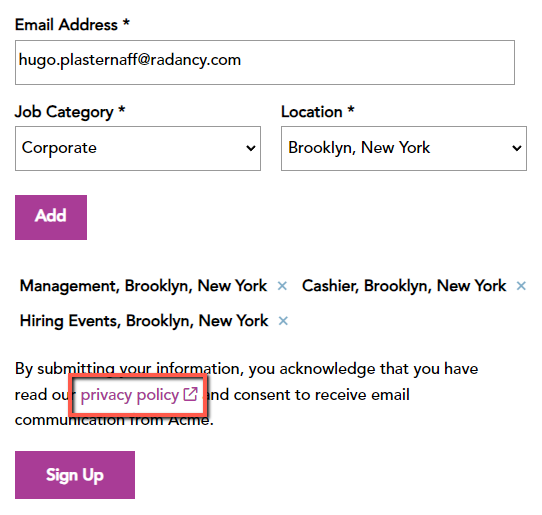
The code may look something like this:
<a href="../privacy-policy/" target="_blank">Privcy Policy <img src="new-window.png" alt="Opens in a new window"></a>There are several different ways to handle coding here. This is the most direct and is an excellent example of doing something in an equal way for both disabled and non-disabled users alike.
Thank you for your effort in helping make the websites Radancy produces more inclusive and friendly to all.
Resources Anchor ()
- Giving users advanced warning when opening a new window by W3C
- Link Targets and 3.2.5 by Adrian Roselli
- Opening Links in New Browser Windows and Tabs by Jakob Nielsen and Anna Kaley
- The Last Word (Maybe) on Opening New Windows by Michael Spellacy
- How to Stop Opening Links in New Windows without Warning by Nicholas Steenhout